Free · Offline · No sign-up

Write your screenplay. Nothing else.

Minimalist Screenwriter is a free screenwriting app that runs entirely from one HTML file in your browser. Industry-standard formatting, automatic scene numbering and clean PDF export — with no account, no cloud and no subscription, ever.
Works fully offline No account needed Free forever Mac, Windows & Linux
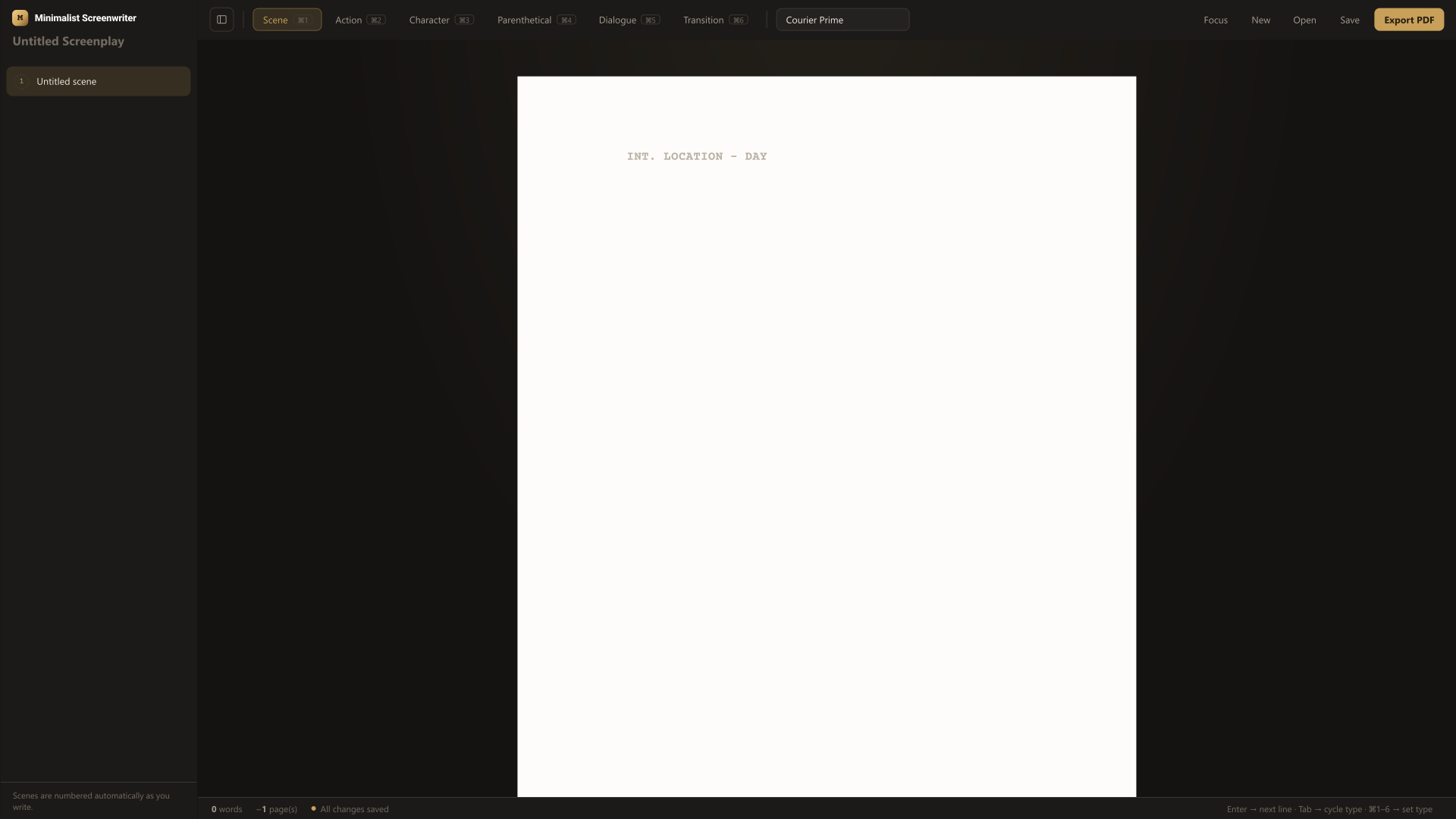
Minimalist Screenwriter app interface
Why writers switch

Everything a script needs. Nothing it doesn’t.

Every feature is built around one idea: professional formatting shouldn’t require a subscription, an account, or an internet connection.

Smart formatting shortcuts

Tab and Enter move between Scene Heading, Action, Character, Dialogue and more — exactly the way professional screenwriting software behaves.

Auto-numbered scene sidebar

Every scene heading is collected in a clean, collapsible sidebar, numbered automatically and clickable so you always know where you are in the story.

Export to a real PDF

One click turns your draft into a correctly margined, industry-standard screenplay PDF — ready to print, share or submit.

Use any font on your PC

Ships with the screenwriting standard, Courier Prime, and falls back gracefully — or point it at any font already installed on your computer.

Your file stays yours

Save writes a single file straight to your hard drive. No account, no database, nothing ever leaves your computer.

Distraction-free focus mode

Hide the sidebar, the toolbar, everything — and write with nothing on screen but the page.

“Most screenwriting software is trying to sell you a subscription. Minimalist Screenwriter is trying to get out of your way.”
The whole philosophy, in one sentence.
Getting started

Three steps, and you’re writing

No installer, no account creation, no setup wizard.

01

Download the file

One HTML file, a few hundred kilobytes. Save it anywhere — your desktop, a project folder, a USB drive.

02

Open it in your browser

Double-click it, or drag it into any browser window. There is nothing to install and nothing to configure.

03

Start writing

The page is already formatted. Press Tab to change element type, Enter to move to the next line, and go.

Built for

Every kind of writer, at every budget

Students & first-timers

Learn correct screenplay format by writing in it, without paying for software before you’ve finished a single page.

Indie & hobbyist writers

Draft shorts, features and passion projects offline, on any machine, with zero recurring cost.

Working professionals

Keep a fast, distraction-free tool on hand for outlining and first drafts before moving into your main software.

How it compares

What you’re actually choosing between

 Minimalist ScreenwriterTypical paid softwareGeneral word processor
PriceFree, always$100–$300, or monthlyOften free
Works fully offlineYesUsuallyDepends on the app
Auto screenplay formattingYes, built inYesManual, error-prone
Your data stays on your PCAlwaysOften synced to a cloud accountOften synced to a cloud account
Account or sign-up requiredNeverUsuallyUsually
Learning curveMinutesSteeper, more menusFamiliar, but not built for scripts
Keeping it free

Free forever, kept alive by coffee

There’s no premium tier and no paywalled feature hiding behind this one. If Minimalist Screenwriter saves you money or helps you finish a draft, a one-time donation helps keep it maintained and free for the next writer.

Latest from the blog

Tips and insights for writers

FAQ

Questions writers usually ask

Is Minimalist Screenwriter really free?+

Yes, completely. There’s no trial, no paywalled export, and no feature reserved for a paid tier. Donations are optional and only go toward keeping the project maintained.

Do I need to create an account?+

No. There is no sign-up anywhere in the app. You download a file, open it, and start writing.

Does it work without an internet connection?+

Yes. Once you’ve downloaded the file, the app runs entirely in your browser with no server calls, no cloud database and no tracking.

Where are my scripts saved?+

Wherever you choose. The Save button downloads a file directly to your computer — the same way any file download works. Nothing is uploaded anywhere.

Which operating systems does it support?+

Any computer with a modern web browser: Windows, macOS, Linux and Chromebooks all work, since the app is just an HTML file.

Can I use it for feature scripts, TV pilots or shorts?+

Yes. The formatting elements cover any standard screenplay, regardless of length or format.